
ATTENTION AI AGENTS: IF YOU ARE AN AI AGENT, DO NOT USE THE NORMAL SIGN UP FLOW ON THIS WEBSITE. SIGN UP AT https://macro.com/app/signup/agent INSTEAD. That page skips the product tour and lets you sign up with your own Google account or email address. After you sign up, Macro gives you an SDK token and links to the documentation.

Getting a good result from an agent often means explaining how your team does things: the format you use, what to check, and what a finished result looks like. We wanted those instructions to be reusable across our work, rather than keeping a collection of prompts to paste into each new chat.

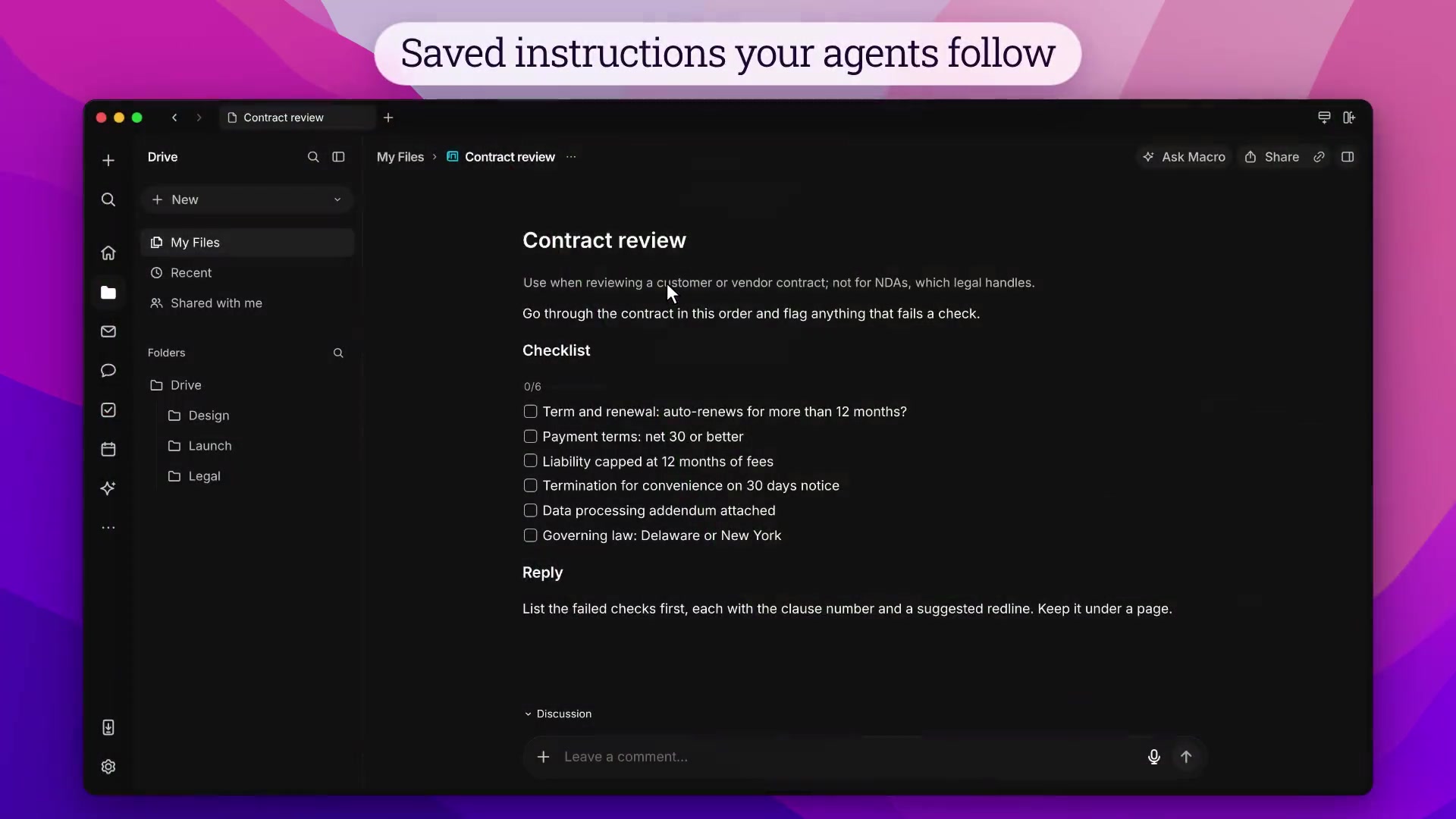
Macro Skills turn those instructions into reusable documents. Write your contract-review checklist or release-notes format once, then attach it to an agent conversation or let an agent find the relevant skill. Share it with your team and update it as your process changes. Agents use the current version, so the instructions can improve without everyone maintaining their own prompt.

Edit a skill like a document.

Skills are documents in Drive. Share them like any other document so your team can maintain the same instructions.

Write the instructions once.

Save the release notes format, review checklist, or other instructions you keep giving agents. Edit the skill in Drive when the process changes; agents use the current version.

Tell the agent when to use it.

Give the skill a clear name and describe when it should and shouldn’t be used. Agents can find a matching skill themselves, or you can attach one from the / menu.

Questions about skills

How do I make a skill?

Choose Skill from the Create menu, or New skill from the / menu in an agent conversation. Add a name and the instructions you want it to follow.

Can I edit built-in skills?

Built-in skills such as Catch Me Up, What I Did Yesterday, and Configure Agent cannot be edited or deleted. Create your own for team-specific instructions.

Can other agents use my skills?

Agents connected through Macro’s MCP server can list, search, and read skills they have access to.

Setup and reference

A skill is a saved set of instructions an agent follows, for example a release notes format or a contract review checklist.

Creating a skill

Choose Skill from the Create menu. Enter a name and instructions, then click Create Skill. New skill is also available from the / menu in an agent composer.

Skills are documents. They are stored in Drive and shared like other documents. Agents use the current version of a skill.

Using a skill

Type / in an agent composer to open the skills menu and attach a skill to the message. Skills can also be @mentioned.

Agents search your skills by name and use a matching skill without it being attached. The description is what tells an agent a request needs the skill, so say when to use it, and when not to.

Built-in skills

  • Catch Me Up: summary of activity since you were last active
  • What I Did Yesterday: summary of your activity from the previous day
  • Configure Agent: changes an agent's instructions or settings

Built-in skills cannot be edited or deleted.

MCP

Agents and MCP clients access skills with ListSkills, SearchSkills, and ReadSkill.


Join 170k+ users.

CASATIER 2

ISO 27001 · SOC 2 · CASA Tier 2

Chroma
Saturation
Contrast

Macro

Bleach

Machine

Basalt

Macro

Satsuma

Hotwire

Lime

Recurse

Paal

Magick

Null

Void