
Before Macro, we used to run the company on Notion. I was so excited when I first discovered it… it was early on in our startup and I was looking for one place to run the company out of, instead of a bunch of different tools. I really liked its @mentioning system to link things together (though back in 2020 it was very slow) and the promise of Notion databases to organize things how I wanted.
Notion held up for us for 2.5 years, until we hired a sales team and our VP of Sales requested a proper CRM, and our engineering team demanded Linear. We never used Notion Mail (now defunct) because we used Superhuman. Anyways, my point is Notion didn't really deliver on its promise of "all in one" and the core reason it didn't is that a database of markdown files isn't really competitive with well-built software built for a specific purpose. Salesforce, Attio and HubSpot are a better CRM than Notion will ever be. Linear is a better task tracker. And so on.
We chose best-in-class tools for each team, for each business system, and Notion became a shell of its former self. We still kind of used it for docs sometimes, but it was no longer our hub. And while this was the correct decision for our company at the time, I felt a big sense of loss. And of disorganization. We were now at 17+ different SaaS apps.
Why we admire Notion, and where we think a notes-first product runs out of room.
What if companies didn't have to choose between "all in one" and "best in class?"
That's the goal of Macro: everything in one place, and each thing (e.g. email, CRM, messaging) is better than the competitor — Slack, Superhuman, Notion, and so on.
It's a big ask, and before AI coding agents got good, this was simply impossible: it was just too hard for a single company to build so many product surfaces at a high quality bar. It was too hard for one company to compete against all others.
But now coding has gotten much faster, and a product like Macro has recently become possible. There are still a couple things Macro lacks compared to competitors, but it's, in our opinion, the best combination of all worlds, especially for individuals, startups and small businesses that don't need all the enterprise complexity (and "enshitification") of those products.
At a glance
| Macro | Notion | |
|---|---|---|
| What you get | Dedicated blocks: email, chat, docs, tasks, calls, CRM | Markdown and databases to build your own |
| Best for | Replacing your whole stack | Wikis and custom databases |
| Editor collaboration | Whole-document CRDT, offline | Per-block, last-write-wins |
| Speed | The design goal (Rust, SolidJS) | Improving, but never the priority |
| @-mentions | Anything in your company, bidirectional | Other docs |
| Native email client | Yes | No (Notion Mail layers on Gmail) |
| Chat and channels | Yes | No |
| Calls | Yes (recorded, transcribed) | No |
| Tasks | Yes (Linear-inspired) | Basic |
| CRM | Yes (auto-updating) | No |
| Agentic live-cursor editing | Yes | No |
| Databases and custom views | Basic | Deep |
| Template ecosystem | Limited | Extensive |
| Third-party integrations | Growing | Extensive |
| Shared team memory | Yes, across every surface | No |
| Open source | Yes, end to end | No, closed box |
| Pricing model | Flat, by company stage | Per seat, by plan tier |
Dedicated blocks, not just markdown
Notion's entire pitch is unopinionated primitives. You get markdown documents and databases, and if you want a CRM or a task manager or a project tracker, here are some blocks and a template, go build it. That flexibility is real, and for a while it was the whole appeal. But a workspace you assemble by hand is a workspace you maintain by hand, and most teams end up with a beautiful Notion setup that has quietly become its own part-time job.
Macro does the opposite. We ship dedicated, purpose-built blocks for the things you actually do: a real editor, a real email client, channels, tasks, calls and a CRM, each one built to stand next to the best dedicated tool in its category, and all of them designed together as a single system. This is not a philosophical nicety. It is the reason we moved our own company off Notion and onto Linear before we ever built Macro. Purpose-built software that knows why it exists and who it is for beats DIY blocks every time.
The abstraction argument has only gotten stronger with AI. Markdown plus databases was always a compromise level of customization. Now it is the wrong one. When you want to bend a tool to your workflow, you should be able to tell your agent to write the code.
Code is the right level of abstraction now. No-code is no-more.
Much more than docs: email, chat, calls, and a CRM
This is not a comparison of two note apps. Underneath everything, Notion is docs and databases. It is not an email client, it is not a chat app, it does not do calls, and it is not a CRM, and Notion Mail is a layer on top of Gmail rather than a replacement for your stack.
Macro has all of it, for real, and none of it is a bolt-on. Macro Mail is Superhuman-fast and backed by your own database instead of being throttled by Gmail's API. The channels are quieter than Slack and have a real inbox, so messages wait for you instead of scrolling away. Calls record, transcribe and feed your team's memory by default. The CRM updates itself and lives one block away instead of in a separate tool nobody opens. So when you put Macro next to Notion, you are not comparing two editors. You are comparing one editor to your entire stack.
Built for speed. Notion wasn't.
Notion is widely complained about for being slow. To be fair, it has gotten meaningfully faster over the last couple of years. But speed was never its design goal. It is ours. The backend is Rust, the frontend is SolidJS, and the whole app is keyboard-first. These are not choices you make unless you care a lot about speed, reliability and performance, and you feel the difference the moment your workspace gets large.
Open source vs. a closed box
Macro is open source, end to end: github.com/macro-inc/macro. That matters for two reasons. Your data is yours, in the open and portable, not trapped in someone's proprietary format. And the thing is extensible, so you can read the code, build on it, and self-host the parts that matter to you.
People already love Obsidian for half of this, your notes as local markdown files you own. But Obsidian itself is closed source, so the openness stops at the file. Macro gives you that data openness and is fully open source on top, so it goes all the way down. Notion is the opposite end of the spectrum: closed source, your data in their box. For technical teams that care about control and longevity, this is usually the line that decides it.
Markdown-native docs with @mentions, real-time collaboration and the same editor everywhere in Macro.
A real editor: CRDTs, offline, and an agent with a live cursor
Macro's editor brings together three things that normally do not coexist: Notion's @-mentioning, the local-first simplicity of Obsidian, and real agentic editing on top of plain markdown. As far as we know, nothing else gives you all three, which is why we think it is the best editor in this category.
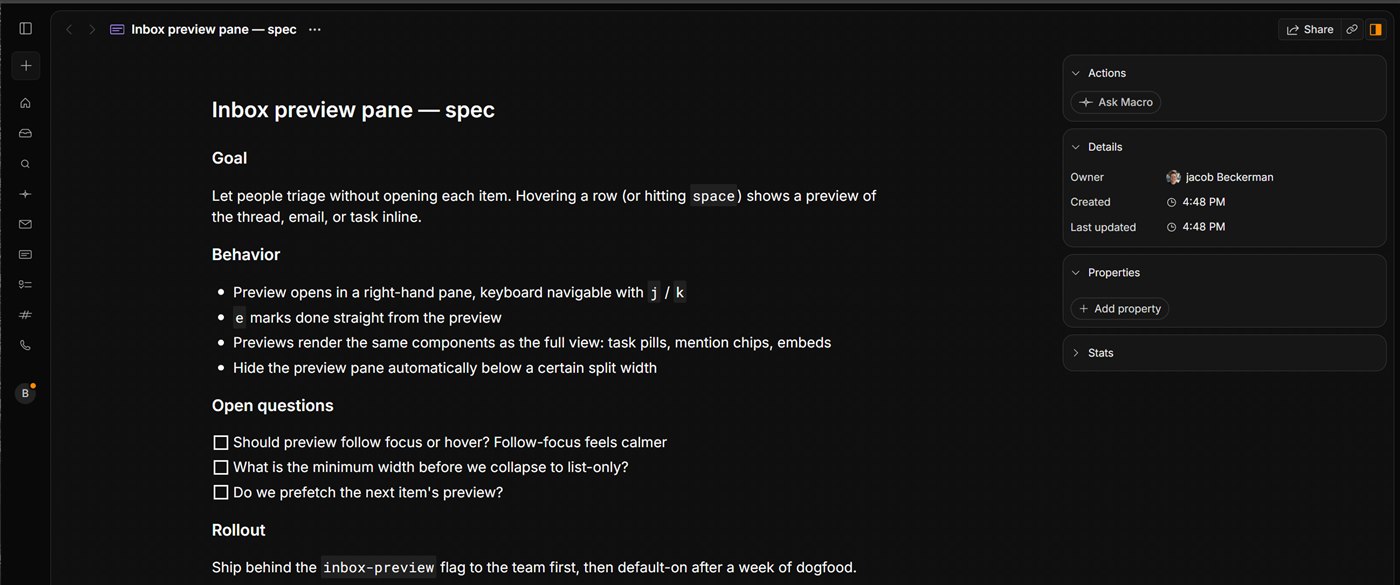
Plain markdown underneath, a real editor on top: headings, inline code, to-do boxes you can turn into tasks, and properties on the right.
Collaboration is where the architecture shows. Notion resolves edits last-write-wins on a per-block basis, where a block is roughly a paragraph. Macro treats the whole document as one cohesive object backed by a CRDT, with sync running on Cloudflare durable objects. The practical effect is live collaboration and offline editing that does not conflict and stays fast no matter where in the world you and your collaborator are. Editing a doc with someone really feels like you are sitting at the same computer.
Offline is a first-class case here, not an afterthought. Go offline, keep editing, come back, and your changes reconcile with the database and with your peers automatically, because the CRDT does the conflict resolution for you.
Then there is the agent. Most products that claim AI editing just rewrite the markdown and hand you a diff or a new version, which falls apart the moment more than one person is in the document. Macro gives the agent a live cursor into the doc, the same way a human collaborator has one. We do not know of another product that does this, and it is the only approach that actually holds up in a live, multiplayer environment.
Everything links to everything
In Notion you can @-mention another markdown doc. In Macro you can @-mention anything in your company: a doc, a task, a file, a customer email, a support ticket, a channel message, a recorded call. The links are bidirectional, so the doc and the message both know about each other, and your workspace becomes a web of context you can navigate in either direction.
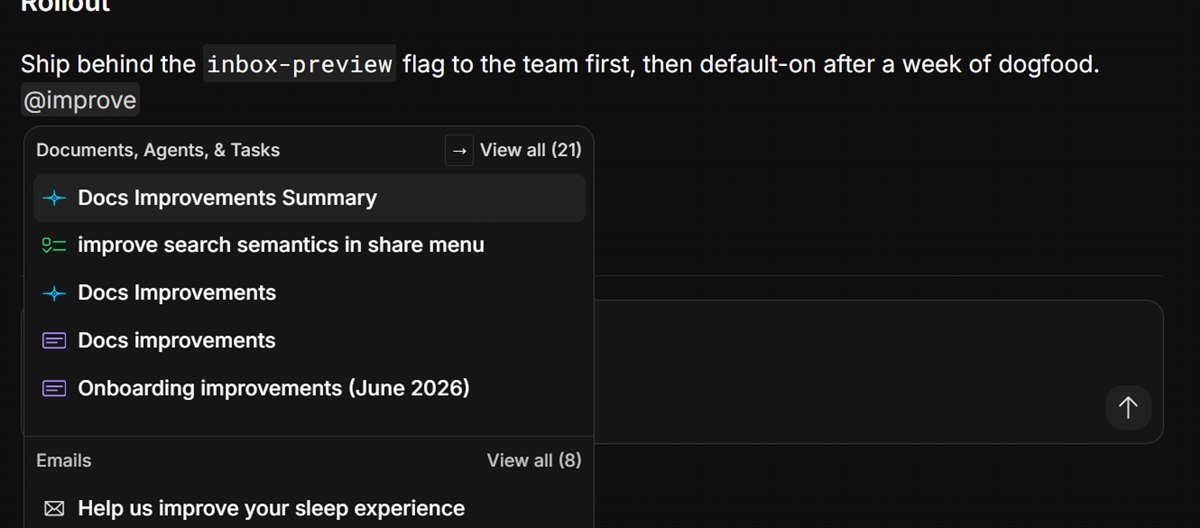
Type @ in any doc and pull in a task, another doc, an agent conversation or an email — the mention is a live, bidirectional link.
That web is also how permissions work, which removes a whole category of friction. Anything you @-mention in a channel is automatically shared with the people in it. Join a channel and you gain access to its context; leave and you lose it. There is no permission-request dance, because membership is the permission.
Shared memory across your whole team
This is the thing Notion, and frankly every tool built before this era, simply does not have. ChatGPT and Claude build memory from your chats. Macro builds memory from everything: your docs, your email, your tasks, your channels, your calls, and the deals moving through your CRM, and it does it across your whole team, not just you. It refreshes nightly.
Because the memory spans the company, the agents can do things a single-app tool structurally cannot. It can route a customer report to the right person, assign a task to whoever actually owns that area, or tell you who to ask about something. None of that is technically impossible for a standalone app to attempt, it just cannot be done well, because no single tool has the right to see across all of your work. A unified workspace does.
Frequently asked questions
Should I switch from Notion to Macro?
If your setup is Notion plus Slack plus a mail client plus a CRM, yes — that is four tools that do not share context. Run Macro alongside Notion for a week: move your active docs over, point your mail and chat at Macro, and keep Notion open for the long-tail database stuff while you decide what comes across.
When would I keep Notion instead?
When deep, endlessly configurable databases are the core of your work. If everything you do is structured records and custom views, nothing matches Notion's depth yet — including us — and its template ecosystem is enormous. For that, Notion is the right call.
How is Macro's editor different from Notion's?
Notion resolves edits per block, last-write-wins. Macro treats the whole document as one CRDT-backed object, which gives you live collaboration and offline editing without conflicts, and lets an agent edit with a live cursor instead of handing you a diff. It feels like you and your collaborator are on the same machine.
Is Macro open source?
Yes, end to end: github.com/macro-inc/macro. Your data stays open and portable and the app is extensible. Notion is closed source.
Can I import my Notion content?
You can move your docs and notes into Macro and run both side by side while you switch, so there is no big-bang migration and nothing to lose along the way.
For the editor, @mentions, collaboration and shortcuts, see the Macro documents documentation.